 wargame Windows Easy 7/25/2026
UnderTheWire-Oracle
Overview
Most of the under-the-wire stuff is pretty simple. So I’m starting with oracle then we’ll go from there.
Level 1
We need the initial credentials which for all UTW is $game1@game so oracle1@oracle.
We’ll do simple stuff to make our lives easier for all wargames like this.
cat << EOF >> ~/.ssh/config
Host century cyborg groot oracle trebek
   HostName %h.underthewire.tech
   port 22
   RequestTTY no
EOF
And…
game="oracle"
echo 'oracle1' > ${game}_passwords

lvl=0
((lvl++)) && sshpass -p $(sed "${lvl}q;d" ${game}_passwords) ssh -q -o StrictHostKeyChecking=no ${game}${lvl}@${game}
Now we can just use the same command to login to the levels.
And as a note most commands can be easily found by a simple gcm *keyword*
Challenge:
The password for oracle2 is the timezone in which this system is set to.
Gotten with the timezone cmdlet
(Get-Timezone).idLevel 2
Challenge:
The password for oracle3 is the last five digits of the MD5 hash, from the hashes of files on the desktop that appears twice.
This one makes use of the group-object cmdlet!
Gci | %{ Get-FileHash -Algo md5 $_ } | group-object Hash | ? { $_.count -eq 2 } | Select -ExpandProperty Name | %{ $_.toLower()[-5..-1] -join ""}Level 3
Challenge:
The password for oracle4 is the date that the system logs were last wiped as depicted in the event logs on the desktop.
Get-WinEvent cmdlet. The event logs being cleared, from the initial look at the file is id 1102.
Get-WinEvent -Path .\*.evtx | where id -eq 1102 | select -ExpandProperty TimeCreated | %{ [Datetime]::Parse($_).ToString('MM/dd/yyyy')}Level 4
Challenge:
The password for oracle5 is the name of the GPO that was last created PLUS the name of the file on the user’s desktop.
Get gpo with some sorting.
(Get-Gpo -All | Sort CreationTime -Descending | Select -First 1 -ExpandProperty DisplayName).ToLower() + (gci |Select -expandproperty Name)Level 5
Challenge:
The password for oracle6 is the name of the GPO that contains a description of “I_AM_GROOT” PLUS the name of the file on the user’s desktop.
More GPO querying, nothing to fancy
((Get-GPO -All | ?{$_.Description -like '*GROOT*'} | select -ExpandProperty DisplayName).ToLower(),(gci -name)) -join ""Level 6
Challenge:
‘The password for oracle7 is the name of the OU that doesn’t have a GPO linked to it PLUS the name of the file on the user’s desktop.’
This one looks a bit more ugly honestly.
(Get-ADOrganizationalUnit -Filter * | ?{ -not $_.LinkedGroupPolicyObjects.count -and $_.Name -ne 'Groups'} | Select -ExpandProperty Name).ToLower() + (gci -name)
Get-GPO -All |%{[xml]$r = $_ | Get-GPOReport -ReportType XML; if ($r.GPO.LinksTo -eq $null ) { Write-Host $_.DisplayName} }

}
Level 7
Challenge:
he password for oracle8 is the name of the domain that a trust is built with PLUS the name of the file on the user’s desktop.
(Get-ADTrust -Filter * | Select -Expand Name ) + (Gci -Name)Level 8
Challenge:
The password for oracle9 is the name of the file in the GET Request from www.guardian.galaxy.com within the log file on the desktop.
This one is tricky to get the exact name without sorta cheating by knowing the name. So this is horrendously ugly, but it works.
Suffice to say it’s easy enough to find the relevant information with hust -Pattern ‘guardian.galaxy’
gc logs.txt | sls -Pattern 'guardian\.galaxy.*GET\s+(?:/[^/\s]+)*/([^/\s?]+)' | %{ $v = $_.Matches.Groups[1].Value; $v.substring(0,$v.length-4)}Level 9
Challenge:
The password for oracle10 is the computer name of the DNS record of the mail server listed in the UnderTheWire.tech zone PLUS the name of the file on the user’s desktop.
This one is a little tricky, because you have to know some windows dns stuff. But you’re looking for the DNSServerResourceRecord.
(Get-DNSServerResourceRecord -ZoneName UnderTheWire.Tech -RRType MX | Select -Expand HostName).split('.')[0] + (GCI -Name)Level 10
Challenge:
The password for oracle11 is the .biz site the user has previously navigated to.
This one was tricky, and I didn’t have the slightest commandlet idea as to where to start. There is like DNSClientCache, but that’s not what they’re going for. Apparently it’s a legacy thing with internet explorer that logs the TypedURLS. You gather them from the registry. However this one session had some odd issues, it looks like some user broke some stuff and they don’t have a cleanup script for this session.
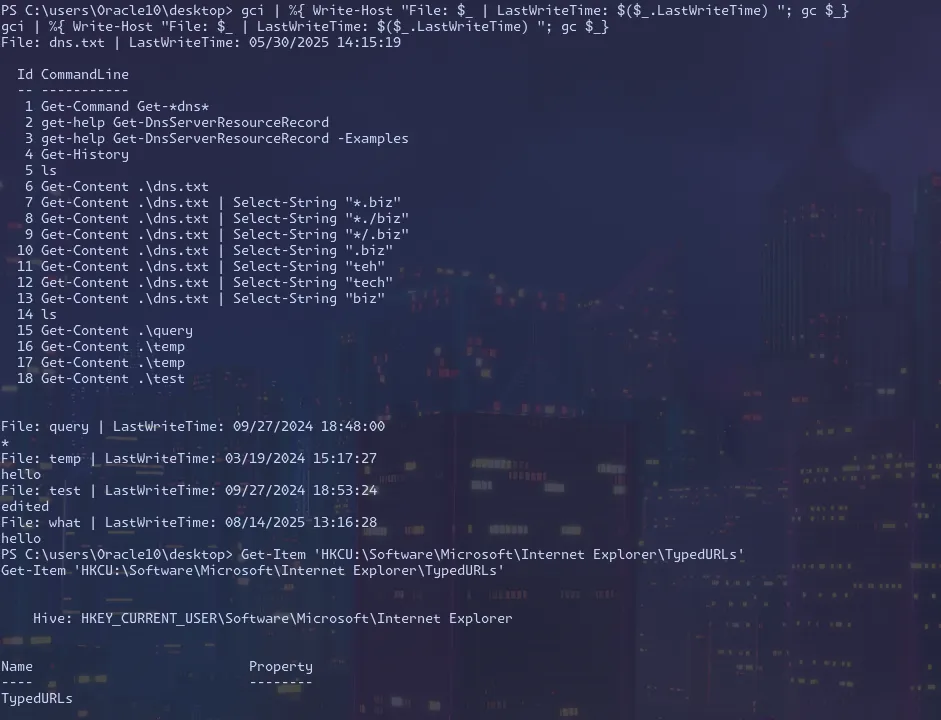
As you can see I had some lingering desktop files and the registry is purged. This makes the level insolvable. So I have to cheat and find the answer and add it back for the other unknowing participants.
So we get to do a bit more now… We’ll cheat and add back all the stuff, since we don’t have a backup registry hive or any other special access.
The sites were: http://go.microsoft.com/fwLink/p/?LinkId=255141 http://google.com http://underthewire.tech http://bimmerfest.com http://nba.com http://yondu.biz http://hardknocks.edu http://installation.org
So we stick these in an array and set them back, to restore the wargame proper.
$sites = @(
"http://go.microsoft.com/fwLink/p/?LinkId=255141"
"http://google.com"
"http://underthewire.tech"
"http://bimmerfest.com"
"http://nba.com"
"http://yondu.biz"
"http://hardknocks.edu"
"http://installation.org"
)

for ($i=1;$i -lt $sites.length+1;$i++) {
Set-ItemProperty 'HKCU:\Software\Microsoft\Internet Explorer\TypedURLs' -Name "url${i}" -Value $sites[$i - 1]
}
Now our session is back to normal! We can uh…solve it now
((Get-ItemProperty 'HKCU:\Software\Microsoft\Internet Explorer\TypedURLs').PsObject.Properties | ?{ $_.Value -like '*.biz'} | Select -Expand Value).split('/')[2].split('.')[0]Level 11
Challenge:
The password for oracle12 is the drive letter associated with the mapped drive that this user has.
This one my initial instinct was get-psdrive, but it turns out its smb. Which a simple ‘gcm smb’ will populate the lkely command to run.
and honestly, this one is easy enough to actually brute force with hyrda if you really wanted.
(Get-SMBMapping | Select -Expand LocalPath).ToLower()[0]
and honestly, this one is easy enough to actually brute force with hyrda if you really wanted.
Level 12
Challenge:
The password for oracle13 is the IP of the system that this user has previously established a remote desktop with.
This one is another registry finding adventure, looking for a saved server.
gci 'HKCU:\Software\Microsoft\Terminal Server Client' | Get-ItemProperty | Select -Expand PSChildNameLevel 13
Challenge:
The password for oracle14 is the name of the user who created the Galaxy security group as depicted in the event logs on the desktop PLUS the name of the text file on the user’s desktop
Winevent logs are actually atrocious to parse. They store their properties in an array. Which is annoying to get a specific field.
The event with some googling is 4727.
But it seems like, 0=groupname and 5 = WhoCreated
(Get-WinEvent -Path .\security.evtx | ?{ $_.id -eq 4727 -and $_.Properties[0].Value -like '*galaxy*'}).Properties[4].Value + (gci -exclude *.evtx -Name) Level 14
The password for oracle15 is the name of the user who added the user Bereet to the Galaxy security group as depicted in the event logs on the desktop PLUS the name of the text file on the user’s desktop.
Almost the same exact command, just need a simple event id change.
(Get-WinEvent -Path .\security.evtx | ?{ $_.id -eq 4737 -and $_.Properties[0].Value -like '*galaxy*'}).Properties[4].Value + (gci -exclude *.evtx -Name)
Level 15
That’s all folks!